A smoother start.
Book a visit, register the patient, assign a doctor and follow the queue from the front desk.
 MedCare.
From the first appointment to the discharge desk, bring your people, patient records and hospital workflows into one connected workspace.
A patient registers at reception. A doctor reviews the history. A lab records a result. Billing brings the charges together. MedCare gives each team a workspace for their part of that journey.
Book a visit, register the patient, assign a doctor and follow the queue from the front desk.
Review recorded history, write clinical notes and connect prescriptions, tests and nursing tasks.
Review itemised charges, collect payments and prepare the discharge documents and follow-up.
Useful software should make the next step easier to understand. Here’s how MedCare connects everyday work across your hospital.
Open the assigned patient’s workspace to review the recorded concern, allergies, history and clinical notes together. Continue the encounter with prescriptions and department orders from the same workflow.
A doctor reviews a patient’s earlier notes, records today’s assessment and adds a prescription. The pharmacy and billing workflows can then pick up the relevant entries.
Help the next patient without jumping between unrelated records. Registration, doctor assignment, appointments, payments and document preparation belong to one connected journey.
When a patient is ready to leave, the team reviews the bill and required clearance, prepares the discharge summary from approved details and opens the printable document.
The patient workspace brings the information recorded for that patient into a more accessible view. Appointments, prescriptions, available reports and the billing breakdown are easier to find in one place.
A patient checks an upcoming appointment, finds the prescription from their visit and reviews the billing breakdown without asking each department for a separate update.
People and hospital scenes are illustrative. Explore the actual application captures below.
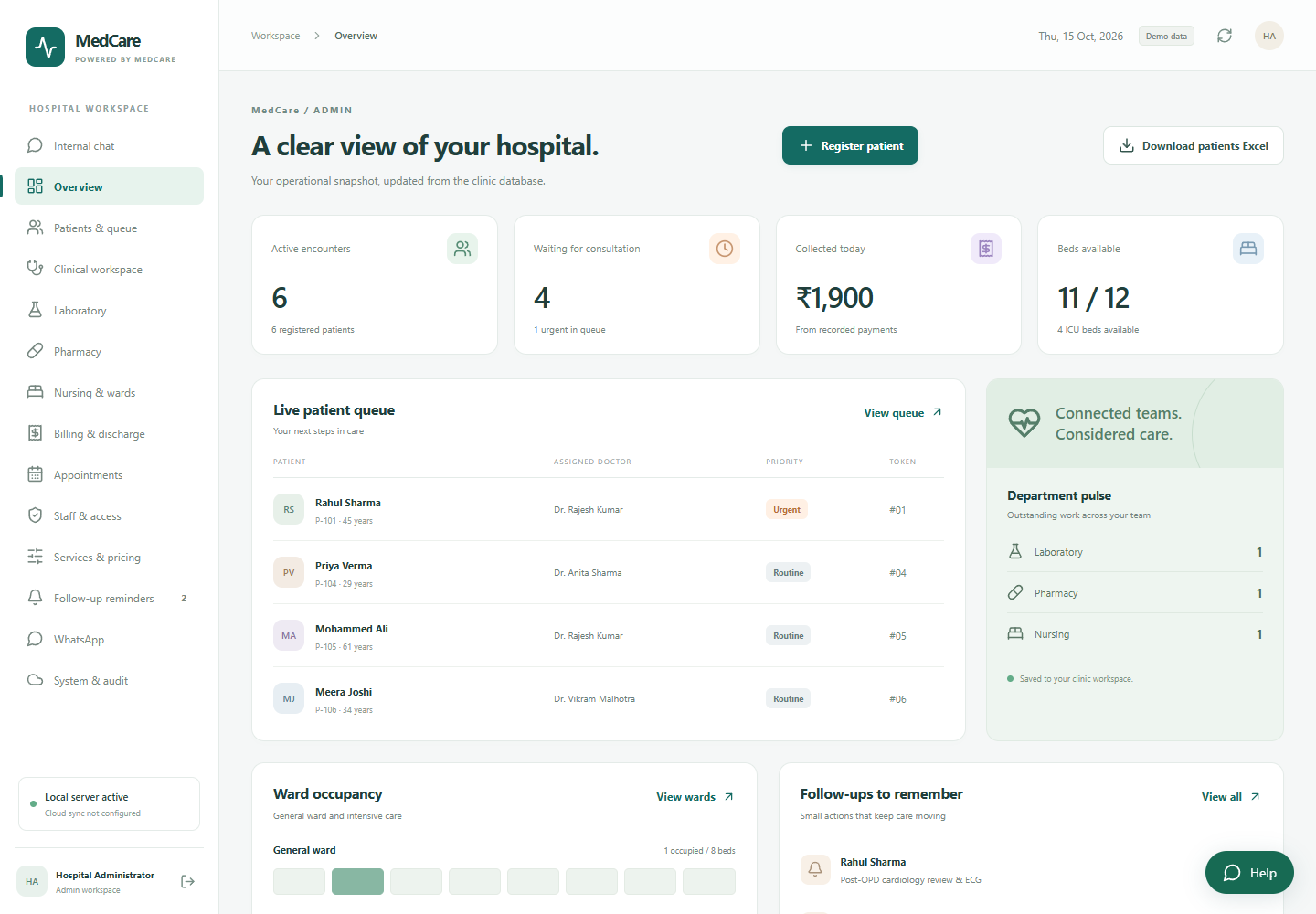
These are captures from a separate MedCare demo environment, using sample records. Choose a screen to explore, or enlarge it for a closer look.
Each person signs in with an account assigned by their administrator.
MedCare’s discharge workflow connects the financial clearance and document steps. Authorised staff can prepare a hospital record using the clinician-approved details, then review the document before printing.
Check the patient, treating doctor and clinician-approved discharge information.
Review the itemised bill, recorded payments and any outstanding work required by the workflow.
Enter or confirm approved details in the document workflow. Authorised staff issue the record after review.
Open the prepared discharge summary, check the details and use the print action from the workspace.
Sample patient · Demo encounter
Illustration of the document workflow. No patient record is created.
MedCare extends the patient journey across the teams that help deliver it, with access based on each person’s role.
Follow requested tests, check payment clearance and record final results with supporting attachments where available.
From request to reportWork from recorded prescriptions, review quantities and stock, and connect dispensing activity with the patient’s charges.
Prescription to dispensingCoordinate assigned nursing tasks, allocate general ward or ICU beds and keep bed availability visible to the team.
Tasks, beds & bedside careManage staff access, service pricing and operational oversight. Review recorded activity through the audit workflow.
People, pricing & visibilityManage upcoming appointments and front-desk reminders so the next visit stays connected to the patient’s ongoing journey.
Before and after the visitPrepare visit reminders and billing messages for staff review. Provider setup, patient contact preferences and the configured workflow determine sending options.
Relevant updates, reviewed by staffA walkthrough of registration, the patient queue, clinical records, department orders, billing and the discharge workflow. Share your hospital’s priorities so the demonstration can focus on the work your team does every day.
MedCare uses role-based workspaces. Reception, doctors, laboratory, pharmacy, nursing, billing, administration and patients have different responsibilities and access. Account setup should reflect your hospital’s workflow.
In a configured deployment, workspaces read the records stored in that hospital’s application. The website gallery uses sample demo records; it is not a live hospital feed. Update timing and connectivity depend on deployment and setup.
Document preparation supports authorised staff using clinician-approved details. Required encounter information, billing clearance and a final review still matter. A quick document action does not replace clinical approval.
External payment and messaging services require hospital-specific provider configuration. Availability, charges, patient permissions and the intended workflow should be discussed during setup.
Tell Faimsoft about your departments, staff roles, patient flow and document needs. We can discuss the current scope, a guided demo, configuration, training, deployment and licensing.
Show us how your hospital works.
We’ll walk you through how MedCare can support it.